Tuesday, March 27, 2007

OUR BRILLIANT BRAINS


After last night's meeting I have been asked to post my inquiry links for "Our Brilliant Brains". Here it is:

http://www.kn.att.com/wired/fil/pages/listbrainpolw.html

The hotlist was created in Filamentality which is a wonderful tool to post up weblinks to support student inquiry (and staff development). Having the links posted on the net allows students to explore further at home or anywhere there is an internet connection, involve their parents and extend their learning boundaries. Next term we will run some sharing sessions on this and you can create similar sites yourself to suport your students' inquiries.

Friday, March 23, 2007

HOW HAS SCHOOL CHANGED SINCE YOU WENT TO SCHOOL?
aka "Pukehina Reaches Out Into The Community" -

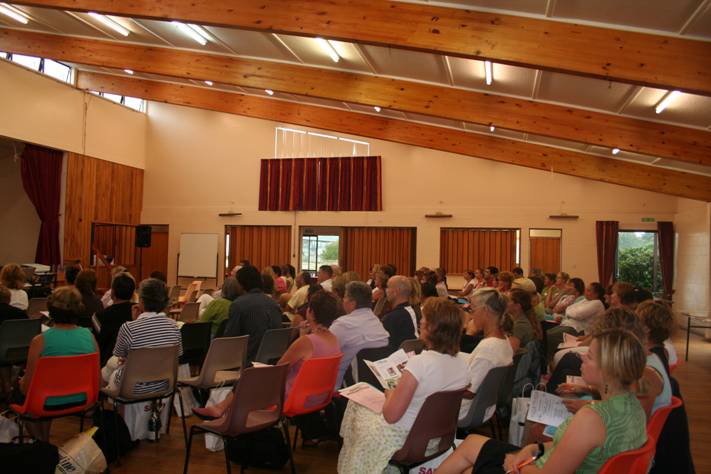
This was the focus of a great night out for 30 - 40 people from around our community as Pukehina School reached out to share learning wider afield. There was a great mix of people and their involvement and questions showed how much they cared about their children's education. Very proud of what is happening in the school, Pukehina stimulated ideas and questions as they shared the new learning dimmensions that our happening in our schools.

Cherie introduced the staff and talked with warmth about the school's vision for learning. Pukehina PROUD features strongly in all that they do. I shared a little of the history of schools, the cluster developments and the impact of ICT in my focus on "How Education Today Has Changed Since Our School Days". Grace shared how she uses the Interactive White Board in the Junior School. Parents found the hands on session quite scary at first but stepped up to the mark and took the risks involved, enjoying the same activities that their children do. John shared his humour and enthusiasm in "How Teachers and Children Use Learning Intentions and Success Criteria" to focus learning. achievement and evaluation. The evening was interspersed with hands on games, interactive activities and spot prizes to keep us active. Lots of questions were generated which made for stimulating discussion. Bronwyn took us through some challenging maths activities which helped us all realise that our children are getting a great education, one that focuses on individual maths learning needs and helps each child to understand the math processes and have fun at the same time. Helen, from the school's BoT then rounded off the evening and further small group discussions, all positive, continued.

Yep we all went back to school and it was great! Parents, grandparents and others realised that it is no longer about how much or how neatly you write in your school books - but what difference our learning actually makes to each of us and to those around us. Congratulations Pukehina. This was a great idea which has certainly made a posotive difference to all who attended - and I am sure to those around them too :->

Thursday, March 22, 2007

RAECO Workshop

I never realised how much fun a RAECO workshop could be 8->. Robin is delighting us with his humour and his skills in covering library books. Twelve from our cluster, including 1 honorary member for the day (Jane from Aquinas), are captivated with what is being shared. Having enjoyed a similar course some years ago, I am relishing the chance to catch up with some other tasks on my laptop, all the while keeping on ear open to catch up with any changes. Thank you Robin. This is a proving to be yet another delightful learning experience which will benefit our school communities.

Wednesday, March 21, 2007

Learning Communities

It has been an eventful week and one of those where you can hardly imagine getting through it all.

Last Friday afternoon the Principals group had a very relaxed and interesting discussion on our cluster development towards sustainability of our Professional Learning Community. We seem to be doing well in this direction although the funding issue will impact heavily. We could tick all the boxes in the development of a learning community as a cluster group and it would be interesting to review these aspects in light of each school’s own PLC. Nancy Groh, Project Manager for the E-learning project was our special guest, joining us from Wellington. Lots of good ideas and affirmations came from the discussions. Perhaps a major value was in viewing parts of the DVD put out by the MoE “21st Century Learner – A glimpse of the future.” Distributed at Learning at School most of our group have not gathered their copy yet and this session showed it to be a valuable resource for showing to BoTs.

I have just finished a delightful session with Room 3 at Paengaroa. These five and six year olds are emailing their buddy class in Melbourne. They are exchanging travel buddies with Room 32 at Our Lady's School in Melbourne.
http://www.olhcelth.melb.catholic.edu.au/index.html The children emailed for the second time this week and are great teachers and learners swapping in their roles as needs demand. Victoria arrived, a soft cuddly teddy bear and was a happy, friendly member of the class. She watched as the class shared her arrival via email.

Tomorrow we have a RAECO workshop at Paengaroa School with ten people expected and then I fly off to take a staff development session after school at Te Ranga. Rotorua for Friday and then a school reunion to begin on Friday night. Should be fun!

Next week promises to be another busy one. Along with a full timetable and the regular bounces from earthquakes, it all ensures that we don’t rest too comfortably for very long!

Monday, March 19, 2007

TE RANGA BLOGS!

Thursday afternoon and Te Ranga Staff will be exploring blogs. Classblogmeister is great and as a tool for learning it withstands my crap detector. It supports learning which is Authentic, Rich Real & Relevant.

I am exploring still and WoW! I have just uploaded the image of the Nga Tii Roa and me! I was surprised it was so simple...

Images have to be compressed to less than 65kb (I think). I used MS Picture Manager to do this. Once saved on my computer, I went into my classblogmeister page, then to Control Panel and way down at the bottom there is an option to upload the images.
1. Class Image will appear in upper LHC of the blog pages of all your students, and all your articles
2. Personal Image will appear in upper right corner of all your blog pages but not the students

I hope Maketu will try this out too.


Maketu Bloggers

Class Blogging is the topic of this afternoon's staff meeting at Maketu School. This will be a first for some and it would be great to have comments added on the value of blogging for their class and/or students.


It is always interesting to have people view your blog and it is great when they add a comment. Some however just quietly visit. It is also interesting to note where the viewers come from. A cluster map can do just that.

Have you thought about adding one to your blog?
Visit the Clustr Map web site. No, it isn't a spelling mistake, clustr is right.
http://clustrmaps.com/getone.php
- Get your own free account.
- Follow Instructions
- Copy the html they tell you to put on your site
- On Blogmeister, go to control panel and paste the html into the “About You” Window

Wednesday, March 07, 2007

Enriching Student Engagement within a Learning Culture (Posted late)

I am sitting here listening to Barbara Anne Alexander ask great questions and these have prompted my own...
- How focused are our students on learning in the classroom?
- Are they aware of why they come to school and into our class?
- How willing and able are they to discuss/share their learning, valuing working as an individual and as part of a team. Celebrating our differences.
- Do they see themselves, and me as both teacher and learner? Celebrating their thinking, having a go. Being part of a learning community, knowing what it is to learn and why? Knowing how they and others learn and taking an active response in this, excited by the opportunities.

We are focusing on Enriching a Learning Culture. Sadly too many students never get the chance to explore “What makes a Great Learner?” or “How Do I Learn?” Yep, students year after year, are still ‘doing’ “Who am I?” at the start of each year. What a waste! Surely they know who they are!

What difference will studying this again at the start of each and every year, make to them? Let’s all embrace the learning culture and make our classrooms all about learning – a real live Learning Zone. Our role as teachers needs to be on learning, having learning focused conversations, asking children what they are learning, why they are learning and how they are learning it and equipping people to become real life long learners who value their school, their classroom, the Principal and their teacher as deep and meaningful sources for learning.

Activities:
- Find quotes about thinking and learning and display them, posters around the learning zone
- QLC – Take a quote and pull it apart.
- Give chn the recipe for success, the cheat sheet to success is the curriculum
- Y Chart “Learning” Revisit at a later time.
- Poems about learning e.g. Acrostic, Definition
- Little Red Hen – Who is going to help us learn – We are said the Parents, principal, etc.

Where do you want your class to be?


The Key: "Not we are learning to" but "We are learning how to..."

Bronwyn is sharing her classroom practice in this area on the 26th April. Can't wait!

"The illiterate of the 21st century will not be those who cannot read and write,
but those who cannot learn, unlearn, and relearn."
~Alvin Toffler

Tuesday, March 06, 2007

Class Web Pages:

This afternoon we looked at a website for Pukehina. Following John Phelps advice we are going ahead using Front Page. We also discussed each class having their own page and how Classblogmeister could fit so well into this aspect. What I liked was that nothing would be published without the prior approval of the teacher. Remember too to have student and parent permissions to publish student work and photos and to use the Internet, email etc. Well we were off. Grace and John both registered and created a class page each. Well the initial stages of them anyway. We learnt that:

- To register you each have to register the school.
http://classblogmeister.com/?blog=rethink
You are then each given our own unique log in password (scroll down to see this).
- In Edit mode you see adverts etc. These do not appear on your published blog unless you specify this.
- Once logged in, enter your specific details, own password etc,
- You can choose one of 8 templates and provide a title for your blog
- Select "articles" link to post your comments on to the blog
- To add students, you need to add a class first. Click on the Class link and then Class Roster.
- Under Display names we chose first name and last initial for safety reasons
- Pictures can be added if they have been uploaded to flickr first. To load images on to flickr you need to join.
http://www.flickr.com/ To join you will first have to register for a yahoo account if you don't have one already.

We struck a problem adding pictures uploaded to flickr until I discovered they were actually gifs that we were clicking on. When we tried it again with jpg files we had no problem at all
  1. We copied the URL of the image from the image properties
  2. In the article box we typed all the following inside sharp brackets: img src="image_url" width="pixels" align="direction"
  3. We replaced img_url with the image URL
  4. We replaced pixels with the pictures pixels approx 72 pixels per inch
  5. We replaced direction with either left or right depending in which side we wanted the image to appear.

Students - you too can also add podcasts. These can be created in Audacity http://audacity.sourceforge.net/ It's free! Once done, export as an mp3

Travel Buddies

Today was a first for a few. I worked with Carol's Room 3 class at Paengaroa and then a surprise presented itself to work with Kathy's Room 2 class as well afterwards. Both are venturing into travel buddies and I am only too happy to share my experience, over 10 years of travel buddies. I just love this way of learning for students, mainly because they love it so much too. It provides a great learning tool for children from 5 to 13 and their teachers! Over the years we have had exchanges to Ireland, England, Scotland, Nova Scotia, Alaska, Canada, USA, Australia and even a kibbutz in Israel, to name a few.

Travel buddies involves an exchange of a soft toy between classes of a similar age. While your class hosts the other classes buddy the children write in the buddy's diary, email the other class regularly, share information about each other's cultures and learning and a myriad of other activities. The children become very attached to the toys who have names, a passport, a persona, a date of birth etc. The students see their travel buddy very much as another class member.

It is great to see the uptake and how contagious this has become within our cluster. Travel buddies provides such a rich, real and relevant context for learning. It provides a genuine purpose in writing and reading and a scaffold for students to share and celebrate their own learning. It provides a stimulating environment for all of us to discover and learn about other people in our global neighbourhood. In learning about others we end up learning so much more about ourselves.

To find out more visit http://rite.ed.qut.edu.au/oz-teachernet/
I have a resource kit too with some of the examples and sample of work I have done over the years.

One wonderful addition to this activity is the development of a classroom blog to support the learning, and after school this afternoon I shared Classblogmeister with the staff at Pukehina School....

Monday, February 26, 2007

Why Blog?

“Our kids need role models and guides to teach them socialisation skills to participate in a connected community”
Graham Wegner

In the past I have used email as a learning tool for connecting students in my classes to a wider global neighbourhood. This has very obviously led to an increase in their understanding of other people’s learning and living but even more importantly a huge increase in their understandings about themselves.
Web 2.0 or 3.0 now - the new social networking tools have become the new learning technologies. Web 2.0 tools will continue to replace the more historic and passive formats. Yep, “E-mailing is for old people“ as one student commented. So true! Unless we grab the tools of our students and embrace them as a learning technology, our students will leave us behind and we will miss a superb opportunity to share our own wisdom with them as they glide into this new social information age.

Connecting students through global learning networks using blogs, wikis, podcasts etc can assist to make learning rich, real and relevant to our students. As Robert Minahan pointed out at the CyberSafety sessions, and to the surprise of their parents, and I suspect – their teachers, our kids are doing it anyway. They have their own beebo sites, myspace pages etc but few have had any guidelines into the safety and ethical aspects to be considered. We have left them to navigate through a mine field with no protection.

Web 2.0 changes our traditional paradigms on how information and knowledge are created, shared and used. We are in a now in a new world. We have Trade Me instead of garage sales, fishpond instead of bookshops, google instead of newspapers, podcasts instead of radio, myspace instead of the mall. Yep we can blog and wiki too. Rather than deny these new social networking tools exist, let’s embrace them with our students, and share our collective wisdom to benefit the future.

I blog to share and reflect, to have added input and learn from others, to be connected to my friends, colleagues and a much wider network and to be involved and learn alongside one another.

“Teachers have the skills and responsibility to teach students how to critically navigate the information overflow but only if they have working knowledge of the new information landscape.”
Graham Wegner

Sunday, February 25, 2007

Learning At School

For those of us fortunate enought to attend this conference, what was the highlight for you? To post your comments to this posting, or any others, just click on the comment link below the relevant posting.
Principals As Lead Teachers:

How are we promoting and sustaining the professional learning community within each of our schools?

Does your vision for learning adorn the staffroom wall or is it more visible in the practices of your school community? If we went into the classrooms and got alongside the students would we see it? What does your vision for learning look like in the faces of your staff, your BoT and parent community, on your ancillary staff, out in the playground?

This succinct 2 page article is a useful guide for schools and captures the key elements:
"What is a Professional Learning Community"
A worthwhile
read as we each continually reflect on our own vision for learning and the progress we as individuals are making towards it.

How is this happening in our own schools? What does it look like, feel like, sound like? Let's look at the key elements and discuss our findings....


I have always thought the actions of people the best interpreters of their thoughts. - John Locke

Saturday, February 24, 2007

Learning At School - Rotorua

I must remember to make my camera next time! Some photos would have been a real bonus.

The conference has been great. My own focus area for this conference was on enriching Inquiry and I wasn't disappointed. I enjoyed presenting the breakout with Gail. It went well and we always gain so much from this experience. During this first breakout session, we shared our cluster's inquiry journey, a lot of the work we have done in the past 10 plus years, sharing some of the many resources we have made and some of the ICT Tools we have found beneficial. It was great to be able to share Carol's class's Sandpit Inquiry also. Paengaroa are really moving well down the Inquiry track as are some of our other schools. Such an enriching experience for those involved. Our presentation focus on Questioning and Thinking, Finding and Using Information to Make a Difference certainly seemed to hit the mark and Carol's junior class inquiry displays this so well.

I missed the first keynote as we were preparing for our presentation but I hear the video by Sir Ken Robinson was great. It can be downloaded from http://www.ted.com/tedtalks/ Will have to catch up with that myself when I get a moment. I know others will want to go over this again too. Thanks to Douglas, and Telecom's bb access, I now have this clip in my trusty USB .

A real highlight for me has been the introduction to Classblogmeister. See the posting below. I'd highly recommend it to all involved in Inquiry or wanting their students to write and read with in an authentic and purposeful environment. Blogging can simply be part of your literacy programme, Thanks to Jody and Tom who shared their knowledge so well. This site can replace the IB5 learning logs used by so many of our cluster students.

Other sessions on Questioning and Virtual Networks will also impact into our cluster inquiry plans. Thanks to Rachel Jeffares for the session on blogging too. I wished I had a whole day to just learn and play with this! The keynotes by David Warlick and Russell Bishop were well worth hearing. I am only just beginning to get my head around the Web 2.0 tools available which really do open a whole new world up. Isn't education exciting! We need to not only embrace these tools but the people changes that have to be made as well. WHS's Mrs Kharana does this so well. Great to see Whakatane High School on the big screen, celebrating such an inspirational teacher. We have always felt privileged to have had Mrs Kharana teach our own children. Would like to view Russell Bishop's slide show all over again.

Our cluster is superb! What a great group to go conferencing with. Thank goodness we have the weekend to recover!

Yep a good few days. I enjoyed the networking with others in so many ways and appreciated the opportunity to be enveloped into such a knowledgeable and friendly group of people, all so ready to share their time, experience, wit and humour. Can't wait til next time!
Classblogmeister: http://classblogmeister.com

Have you thought of having your own interactive class webpage? One where each student can post their own reflections and learning blogs? One where you as the teacher can oversee the content?

Classblogmeister, David Warlick's online blogging tool, is designed for schools with the safety features in mind. This site is amazing and allows everyone in your class to create your own learning blogs, build partnerships and respond with other classes and teachers online.


Let's face it, our kids are doing it anyway (beebo, myspace etc) but they have been given few if any guidelines to using this new media. Make the best of both worlds and use their tools within an educational setting to provide a platform which is rich, real and relevant.

I have this blog already but classblogmeister seems ideal for a classroom forum. Each person in your class can have an online presence which allows everyone to read and write with the world. This is an exciting platform to support your class learning and would be my most favourite find this year. Thanks to Tom and Jody for introducing it to me. Take a look at their class blog sites:

- Jody's Year One site: http://classblogmeister.com/blog.php?blogger_id=1638

- Tom's site:
http://classblogmeister.com/blog.php?blogger_id=993

Wednesday, January 10, 2007

Heading Into 2007 - Happy New Year

Wow! A new year, new adventures and new learning to discover.

February 2nd is all go for our Cluster Conference to be held at Paengaroa School.
- 8.30am to 5pm

Yep, we are repeating the success of last year's teacher only day.


Over 90 enrolments so far making this another exciting opportunity to share and learn from all involved.

Three keynote speakers: Warren Patterson, Dr Gareth Schott and Russell Brebner along with 23 workshops offer diverse and exciting sessions to impact on our own teaching and learning practices.

"The more the merrier" You don't have to belong to our cluster to attend. If you are interested in joining us, contact me at LEWatchorn@wave.co.nz and I'll send out a registration form.


Thanks to Jill Hammonds for sharing these photos. You can check out Jill's blog at http://jillhammondsedblog.blog.co.nz/1499290/ to find out what she discovered on the day. Thank you for this feedback Jill.

Wednesday, October 25, 2006

MULTIMEDIA CHALLENGE

The 2006 WinTec Challenge is on again for students in Year 4,5 & 6
When - Tuesday 14th November, 10 am to 2.30pm
Where - Wintec, Hamilton

Using MS PowerPoint teams will be challenged to retell fairy tales. Each team can take a collection of photo images that they have prepared. These images must include at least 3 different endings to their story.

The expectation is that students will already know how to use PowerPoint, and in particular to:
  • Insert Images
  • Insert sound files
  • Record narrations
  • Time presentations
  • Complete custom animations
  • Include appropriate slide transitions
  • Insert and use action buttons

There will be prizes for the top efforts

To enter your school team, email whowes@xtra.co.nz before October 31st. There is a limit of 30 teams. If there are spaces available after Nov 4th, a second team will be allowed from schools. I wonder if we can ask to go on the waiting list for our 2nd teams. May pay to have one ready and waiting in the wings in case of sickness etc.

COLLABORATIVE PROJECTS FOR YOUR STUDENTS:

Here's an opportunity for students to take part in the development of animations using free software that you can download from the Internet.

Don't wait until you know how to use it - just give it to the kids, provide time for them to explore and then ask them to come up with a class challenge.

PIVOT STICK ANIMATOR can be downloaded free from

http://www.snapfiles.com/get/stickfigure.html

ALICE can be downloaded free from

http://www.alice.org/


PROJECT OPPORTUNITIES:

Paul Wilkinson from Te Papanui Cluster is running a section on Pivot Stick Animation for PC users, (see below for more details) and

Phillip Carroll, a 10 year old from Pine Hill School in Dunedin has prepared an animation project using Alice Software which is available to both Mac and PC users. (More details below too)

These are great opportunities for you to learn about animation alongside your students. The software is a free download.

Let your students explore the software, check out the tutorials and have them teach you how to do animation.

Anyone can! A teacher information section is also provided. If you have trouble logging on, use your Ulearn username and password. Let's know if you have difficulty.

Click on this link to check out the animation project that helps you get started, and invites you (or, more specifically, your students) to take up the challenge

* PIVOT STICK ANIMATOR -

Students love working with Pivot Stick Animation, it's great for designing PE activities, dance, drama and a huge variety of animation effects.

Students are finding innovative ways of incorporating it into learning programmes.

Paul Wilkinson from the Te Papanui cluster has created an animation project that helps you get started, and invites you (or, more specifically, your students) to take up the challenge of adding to the animation he's started - or contribute one of your own. You'll find everything you need. Please note that the project information is in the teacher section on the left, but student work samples should be uploaded to the student community area. (Sorry Mac users - only available for PCs at the moment)

* ALICE -

The good news is yet another cool free downloadable animation software available for both platforms and Phillip Carroll (a 10 year old from Pine Hill School in Dunedin) is currently working to set up a project using this "Alice" software for Term 4.


This software contains a step by step tutorial for those who need a lead in but most students will quickly by pass the tutorial and get straight to creating amazing animations.

These "teach yourself" programmes will be great for your students to explore while you are busy with small group teaching etc. Download now and let them at it.

Monday, October 23, 2006

TOWARDS THE FINISHING LINE -

- What will our teachers write as the eulogy to the Nga Tii Roa Contract once it has finished?

- Has it provided an immense challenge to thinking, pedagogy and community building skills?

- How have teachers been challenged to recognise the impact of ICTs into traditional teaching and learning models?

- Have schools been challenged to develop shared values and beliefs in each school?

Interesting questions as we move into our final year. If there are changes and they are to be sustained, the eulogy will hold consistent positive messages from those involved and these will be supported in teacher's present and future teaching and learning practices.
TEACHER SURVEYS

An on-line survey for cluster teachers has been activated.

Pukehina Staff deserve a box of Jaffas for being the first to complete :-D


We were hoping to have these all completed by October 13th but have extended this until the end of the month.

Due in before October 31st, cluster staff can access the survey from the following link:

http://surveybuilder.edmin.com/surveyRegister.cfm?sc=2C5EE3E7-EED4-441C-924F0896CC337104

Tuesday, September 19, 2006

UMAJIN -

Last Thursday I attended a session where Russell Brebner demonstrated the new updates to the Umajin software. If you haven't had a look at this NZ made application, you just wont know what you are missing. This creative publishing tool is so user friendly and loads of fun, ideal for primary aged children and a great introduction to such things as blue or green screening etc. It encourages exploration and creativity. For more details and to download a free 30 day trial click on: http://www.umajin.com/static/default.htm Good pricing makes this affordable and well suited to the school environment.

In our earlier discussions Gabi mentioned a concern regarding a compatibility problem with the video cards installed in the computers at Paengaroa. Thanks Gabi. This may not apply to your school computers and it would pay to check it out. There is a tool on the website which checks the compatibility of your computer with the software, during the 'trial' download.

I have invited Russell to join in this discussion so please add any questions you may have to this posting. That way we can all benefit from the dialogue.

It will also be worthwhile following it up if you are going to Ulearn. Umajin will be there. Have a play. It is great fun. So innovative!

Lorraine

RELLCO

RELLCO
Our Cluster Journey Together Into New Horizons.